
Last checked: 12. Juli 2026
Making email sovereign: from Gmail & Microsoft 365 to European providers
How to make your email sovereign – with European providers, your own domain and a smooth migration. Provider comparison, encryption, DNS/MX switch and data protection for companies.
By the Euro Toolhub editorial team · editorially reviewed
Email is the most sensitive service in everyday life: it is the master key to almost all other accounts and often holds the most personal information. That makes who processes it all the more important. With Gmail and Microsoft 365, that is US corporations. This guide shows in practical terms how to make your email sovereign – with European providers, your own domain and a smooth migration.
It is editorial guidance, not legal advice. If you want to move your entire software stack to Europe, our guide Replacing US software complements this article.
The essentials in brief
- Email is especially worth protecting – it is the recovery key to almost all accounts.
- European providers such as Proton, Tuta, mailbox.org, Posteo and Infomaniak offer EU/Swiss data processing and, in part, end-to-end encryption.
- Your own domain is the biggest lever: it makes you independent of the provider and allows later switches without losing your address.
- The migration works in six steps – the critical point is the DNS/MX switch.
- For companies, a DPA and the usual GDPR duties apply on top.
Why Gmail and Microsoft 365 are tricky
Gmail (Google) and Microsoft 365 are convenient and widespread – but problematic from a sovereignty perspective:
- US providers, US law. Both companies are subject to the US CLOUD Act; US authorities can in theory demand access, even when data centres are in Europe.
- Analysis of content and metadata. Even without classic ads in the inbox, usage and metadata are processed; the business model is based on data.
- Lock-in. Anyone using a @gmail.com or @outlook.com address is tied to the provider – switching means telling all contacts a new address.
For individuals this is a privacy issue; for companies it is also a compliance question. The good news: there are mature European alternatives. A compact overview is on our Gmail alternative and Microsoft 365 alternative pages.
What makes an email provider sovereign
What to look for when choosing:
- Provider location and data processing in the EU/EEA or Switzerland.
- Encryption – TLS in transit, ideally end-to-end options (PGP) for content.
- Data minimisation – no scanning of content for ads, minimal logging.
- Own domain – does the provider support your desired domain?
- Standards and export – IMAP/SMTP, easy import and export of your mail (no lock-in).
- Business features – if needed: team administration, aliases, calendar, contacts, DPA.
These criteria also feed into our sovereignty score.
European providers at a glance
Five established, privacy-friendly providers from the EU and Switzerland:
| Provider | Country | Encryption | Open source | Sovereignty |
|---|---|---|---|---|
| Proton Mail | Switzerland | End-to-end (OpenPGP) | yes | 82 |
| Tuta | Germany | End-to-end (own method) | yes | 84 |
| mailbox.org | Germany | PGP support | no | 84 |
| Posteo | Germany | PGP support | no | 84 |
| Infomaniak | Switzerland | TLS, PGP via client | no | 86 |
Sovereignty score (0–100), as of July 2026. More providers and details in the email category.
In short: Proton and Tuta focus on integrated end-to-end encryption and their own app world. mailbox.org and Posteo are classic, open IMAP mailboxes with a strong privacy focus and low prices. Infomaniak is a broad Swiss provider, good if you want to bundle email with other services (cloud, calendar).
The providers in detail
- Proton Mail (Switzerland). Integrated end-to-end encryption and a whole app family (Mail, Calendar, Drive, VPN), open source. Ideal if you want a fully encrypted ecosystem.
- Tuta (Germany). Open source, encrypts the subject and calendar too, and is inexpensive. Uses its own encryption method instead of standard PGP – but is particularly easy to use.
- mailbox.org (Germany). A classic, open IMAP mailbox with office features, PGP support in the webmailer and a fair price. Good for business with your own domain.
- Posteo (Germany). Consistently data-minimising, anonymous payment possible, environmentally focused and very cheap. Deliberate limitation: no custom domains.
- Infomaniak (Switzerland). A broad provider with mail, cloud and calendar – good if you want to bundle several services. Standard IMAP, TLS and PGP via client.
What does European email cost?
Sovereign email is cheap. Single mailboxes often start at around €1–3 per month (e.g. Posteo or Tuta); business plans with several users and team features are higher depending on the provider. Add a few euros a year for your own domain. Unlike "free" offers, here you pay with money instead of your data – with full cost transparency in euros. For most individuals and small teams, the switch stays in the low range per month.
End-to-end encryption: what it can do – and what it cannot
End-to-end encryption (E2E) ensures that only sender and recipient can read the content – not even the provider. Important to know:
- Between users of the same service (e.g. Proton to Proton) E2E works automatically.
- To external recipients E2E is only possible with PGP and exchanged keys; otherwise the mail is transmitted encrypted (TLS) but sits unencrypted with the recipient's provider.
- Metadata (who, when, subject) can only be protected to a limited extent technically.
For most people, the combination of an EU/Swiss provider, TLS transport and optional PGP is the pragmatic and far more sovereign path compared with Gmail.
Your own domain: the key to independence
The most important advice up front: use your own domain (e.g. name@yourcompany.com) instead of a provider address. The reason is independence – the domain belongs to you, not the provider. If you switch providers later, your address stays the same; you only change the technical settings. Without your own domain, the lock-in problem repeats with the next provider.
A domain costs only a few euros a year and can be connected at most of the providers listed (exception: Posteo deliberately uses @posteo addresses for privacy reasons). If you already own a domain (e.g. for your website), you can use it directly for email.
Private, business or association?
Depending on the situation, the focus differs:
- Private – a single mailbox with your own or a provider address. Posteo and Tuta are cheap and simple.
- Business – several users, aliases, shared calendars/contacts and a DPA. mailbox.org, Infomaniak and Proton offer team plans.
- Association/education – often with your own domain and few mailboxes; here price and easy administration count.
The migration in six steps
An email migration sounds more complex than it is. This approach works well:
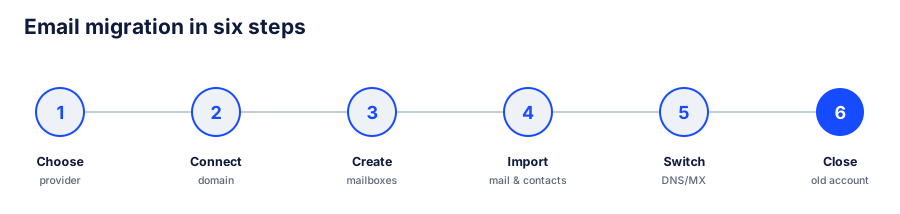
1. Choose a provider – based on the criteria and the table above. 2. Connect the domain – add your own domain to the new account (or register one). 3. Create mailboxes and aliases – set up users, distribution lists and forwards. 4. Import mail and contacts – most providers offer an IMAP import from the old mailbox. 5. Switch DNS/MX – redirect delivery to the new provider (see below). 6. Let the old account wind down – a transition period with forwarding, then close the old account.
Getting DNS and MX right
The technical core of the migration is the DNS switch. Simplified:
- MX records define which server accepts email for your domain. After the move they point to the new provider.
- SPF, DKIM and DMARC are records that authenticate your mail and protect it from being flagged as spam. The new provider supplies the right values.
- Plan the transition – DNS changes take some time to take effect everywhere. Set up forwarding from the old account for a few days so no message is lost.
Always take the exact values from your new provider's instructions. If unsure, make the switch outside peak hours and then test sending and receiving.
Deliverability: making sure your mail arrives
After the move, correct authentication decides whether your mail lands in the inbox or in spam. Three records are central:
- SPF defines which servers may send for your domain.
- DKIM cryptographically signs outgoing mail.
- DMARC defines how recipients handle unauthenticated mail.
The new provider supplies the right values; enter them completely. After the switch, send one or two test mails to different providers (e.g. a Gmail and an Outlook account) and check whether they arrive and are recognised as authenticated. Do not send bulk mail at first – a new domain has to build its reputation.
Use email on all devices
Sovereign providers rely on open standards, so you can use your email everywhere: via IMAP/SMTP in any mail program (Thunderbird, Apple Mail, Outlook), through the web interface and the provider's apps. You sync calendars and contacts via CalDAV/CardDAV. This means you are not tied to a single app – another building block of independence. Before switching, quickly check that your preferred mail program is supported; with the providers listed, it always is.
Your old address: a clean handover
Do not close your old Gmail or Microsoft account immediately. A staggered handover works well:
- Set up forwarding so incoming mail at the old account lands automatically in the new mailbox.
- Inform important contacts and update your signature and profiles (shops, portals, newsletters) to the new address.
- Optionally set an auto-responder that points to the new address.
- After a few weeks, check whether relevant mail still arrives at the old account – only then close it.
This way you lose no message and no contact. Remember to update the address stored as a login at important services (bank, authorities, subscriptions).
Common mistakes when migrating email
- Migrating without your own domain. Then you only shift the lock-in.
- Forgetting SPF/DKIM/DMARC. Without them, your mail lands in spam faster.
- Deleting the old account too early. Only close it after a transition period with forwarding.
- Forgetting contacts and calendar. Export not just mail but also the address book and appointments.
- Only looking at price. Privacy, location and feature scope matter just as much.
Data protection for companies
Anyone using email for business processes personal data – and needs a data processing agreement (DPA) with the provider. Also check EU/Swiss data processing, documented security measures and the ability to fulfil data subject rights (access, deletion, export). A detailed checklist is provided by our guide Choosing GDPR-compliant software.
Frequently asked questions
Can I keep my existing email address?
If you use your own domain: yes. Your address stays the same; you only change the provider behind it. With a provider address (e.g. @gmail.com) you have to switch to a new address – a good reason to use your own domain going forward.
Will old emails be lost in the migration?
No, if you import them. Most providers offer an IMAP import that takes over your existing folders and messages. Allow some time for large mailboxes.
Is European email really more secure than Gmail?
It is above all more sovereign: provider location and data processing are in the EU or Switzerland, the business model is not based on analysing your content, and several providers offer end-to-end encryption. Absolute security never exists, but the privacy level is significantly higher.
Do I need technical knowledge for the migration?
For a single mailbox, the provider's instructions are enough. With your own domain and several users, some basic DNS knowledge – or the support of your domain/IT provider – helps.
What about calendar and contacts?
Most providers support open standards (CalDAV/CardDAV) and an import. Export the calendar and address book from the old account and import them into the new one – so everything is preserved.
Is switching worthwhile for small teams too?
Yes. Small teams in particular benefit from clear prices, EU data protection and easy administration. With your own domain you also stay flexible for future changes.
Does every provider support a custom domain?
Most do – Proton, Tuta, mailbox.org and Infomaniak allow custom domains. Posteo is the deliberate exception and uses @posteo addresses for privacy reasons. If a custom domain matters to you, choose one of the other providers.
Can I use several addresses or aliases?
Yes. All the providers listed support aliases – additional addresses that land in the same mailbox. Handy for separating info@, contact@ and your name without paying for several mailboxes.
Is migration feasible for a company with many mailboxes?
Yes. For larger migrations a staggered approach pays off: first migrate a small test group, check the process, then the remaining mailboxes. Many providers offer bulk import and administration tools; for very large environments, provider support or an IT service provider helps. Because the domain stays the same, the switch is transparent for all users – no one has to change their address.
Next step
The fastest way forward is our EU Stack Check: select your current tools, get matching European alternatives. Concrete providers are in the email category; the complete switch is shown in the guide Replacing US software.
This article is editorial guidance, not legal advice.
The Sovereignty Score is an editorial orientation aid, not legal advice. How we rate.